Understanding Maximum No. of Attempts to Run in Business Central's Job Queue
If you’ve ever built an alert on top of the Job Queue Entry table, you’ve probably run into a confusing moment: your job is configured to retry several times before giving up, yet your alert fires on the very first failure. The root cause almost always traces back to a misunderstanding of two fields that look related but behave very differently — No. of Attempts to Run and Maximum No. of Attempts to Run.
This post walks through what these fields actually mean, how the Job Queue Dispatcher updates them behind the scenes, and what a real retry cycle looks like on disk — using a controlled test codeunit that fails on every run so we can watch the mechanics play out.
The two fields, defined
Both fields live on table 472, Job Queue Entry:
| Field | Type | What it tracks |
|---|---|---|
| No. of Attempts to Run | Integer | How many times the current scheduling cycle has tried to execute this entry and failed. |
| Maximum No. of Attempts to Run | Integer | The ceiling. Once attempts reach this number, BC stops retrying and leaves the entry in Error status permanently. |
The naming is easy to mix up because both fields sound like they’re counting the same thing. They’re not: one is a live counter, the other is a configured limit. Nothing on the entry tells you “retries are exhausted” directly — you have to compare the two.
A test case: Codeunit 70101 configured with 5 attempts
To see this in action, I set up a Job Queue Entry pointing at a codeunit that always throws an error, with the following configuration:
- Object Type to Run: Codeunit
- Object ID to Run: 70101
- Maximum No. of Attempts to Run: 5
- Rerun Delay (sec.): 10
Here’s the entry card after the job had been running for a while:
- Status: Error
- Maximum No. of Attempts to Run: 5
- Rerun Delay (sec.): 10
Using Business Central’s Page Inspection tool on the same page confirms the underlying table fields directly:
- Maximum No. of Attempts to Run (field 11, Integer) = 5
- No. of Attempts to Run (field 12, Integer) = 5
Both fields are stamped Base Application — these aren’t custom extension fields, they’re part of the standard Job Queue Entry table shipped with BC.
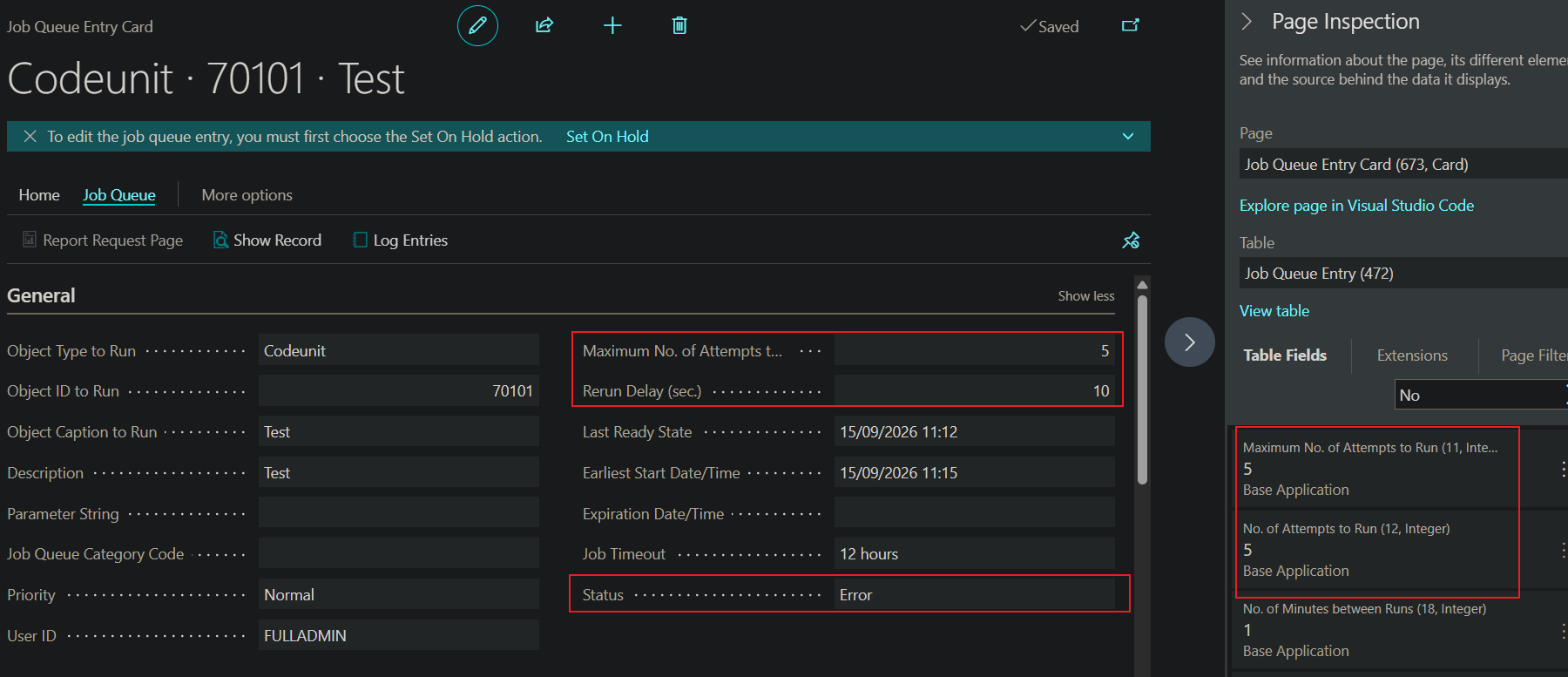 Job Queue Entry Card for Codeunit 70101, with Page Inspection open on the right confirming
 Maximum No. of Attempts to Run and No. of Attempts to Run both equal 5.
At this point, No. of Attempts to Run equals Maximum No. of Attempts to Run. That equality is the actual “retries exhausted” signal. The Status field alone can’t tell you this, because Status also reads Error momentarily between retries, before the dispatcher reschedules the next attempt.
What the Job Queue Log Entries show
Log entries tell a slightly different story than the Job Queue Entry record itself, because a new log row is written on every execution, not just the final one. In this test, the Job Queue Log Entries page showed six consecutive Error rows for the same job (Codeunit 70101, description “Test”), all logged under the same user.
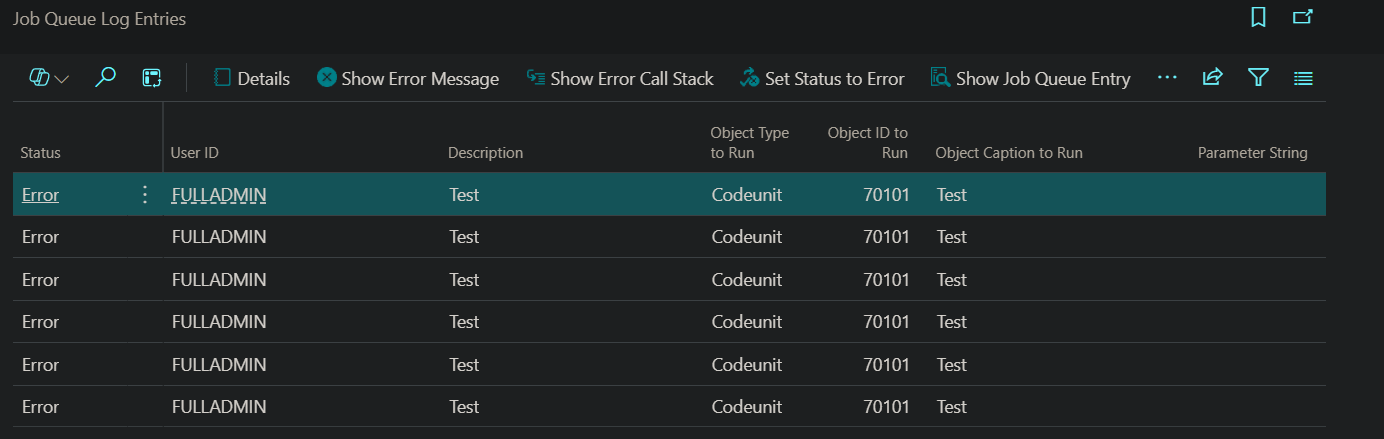 Six consecutive Error log rows for the same job (Codeunit 70101), even though Maximum No. of Attempts to Run was set to 5.
This is worth calling out explicitly, because it trips people up: with Maximum No. of Attempts to Run = 5, you might expect exactly five error log rows before the entry gives up. Seeing six is a reminder that the log is a strict execution history — it doesn’t attach itself to “attempt 1 of 5” labeling. Depending on exactly when a manual restart or a prior scheduling cycle occurred, you can end up with more log rows than the configured maximum, because:
- The log captures every run, including ones from a previous scheduling cycle where the counter had already reset (see the reset conditions below).
- A manual Restart or Set Status to Ready action on the entry starts a fresh attempt cycle without necessarily clearing old log history.
The practical takeaway: never infer “attempts exhausted” by counting rows in Job Queue Log Entries. That table is an audit trail, not a retry counter. The retry counter lives on the Job Queue Entry record itself, in No. of Attempts to Run vs. Maximum No. of Attempts to Run.
How the Job Queue Dispatcher actually updates these fields
Putting the field definitions and the observed behavior together, the retry lifecycle looks like this:
- The dispatcher picks up an entry that’s due to run (
Status = Ready,Earliest Start Date/Timehas passed) and sets it to In Process. - It executes the codeunit/report.
- If it fails:
No. of Attempts to Runis incremented by 1.- A Job Queue Log Entry is written with
Status = Errorand the error message/call stack. - The dispatcher compares the new attempt count to
Maximum No. of Attempts to Run:- Attempts < Maximum → the entry’s
Statusis briefly set toError, then almost immediately flipped back toReady, withEarliest Start Date/Timepushed out byRerun Delay (sec.). The cycle repeats from step 1. - Attempts >= Maximum → the entry stays in
Status = Error. This is terminal — BC will not automatically retry again. Someone has to intervene (Set Status to Ready, Restart, or fix the underlying issue and re-enqueue).
- Attempts < Maximum → the entry’s
- If it succeeds:
No. of Attempts to Runresets to 0, and a Success log entry is written.
When does the counter reset to zero?
- On a successful run.
- When a recurring job’s next occurrence is scheduled — each new scheduled occurrence starts its own fresh attempt cycle, independent of how the previous occurrence ended.
- On a manual Restart / Set Status to Ready action from the Job Queue Entries page.
This matters a lot if your job is recurring rather than a one-off. A recurring job that fails once per occurrence, with Maximum No. of Attempts to Run = 1, will hit its “exhausted” state on the very first failure of every occurrence — which can look identical, at a glance, to a job that never retries at all. The only way to tell the difference is checking the configured maximum.
Why this breaks naive OnAfterModifyEvent subscribers
If you subscribe to OnAfterModifyEvent on Job Queue Entry and check only Rec.Status = Rec.Status::Error, you will fire on every failed attempt, not just the final one — because, as shown above, Status genuinely does pass through Error on intermediate attempts before the dispatcher reschedules it.
The fix is to check attempts against the maximum, and to guard against firing again on unrelated modifications where Status was already Error:
internal procedure IsFinalFailure(Rec: Record "Job Queue Entry"; xRec: Record "Job Queue Entry"): Boolean
begin
    exit(
        (Rec."Object Type to Run" = Rec."Object Type to Run"::Codeunit) and
        (Rec."Object ID to Run" > 50000) and
        (Rec.Status = Rec.Status::Error) and
        (xRec.Status <> Rec.Status) and
        (Rec."No. of Attempts to Run" >= Rec."Maximum No. of Attempts to Run"));
end;
This is the same logic covered in more detail in a companion post on unit-testing job queue alert codeunits.
Practical checklist
When you’re trying to figure out whether a given Job Queue Entry has truly exhausted its retries:
- Open the entry (or inspect the record via Page Inspection).
- Read
Maximum No. of Attempts to Run. If it’s1, there is effectively no retry behavior — every failure is immediately terminal. - Compare it to
No. of Attempts to Run. Equal (or greater) means exhausted; less means it will retry again afterRerun Delay (sec.). - Check
Status.Readymeans it’s about to try again regardless of how many prior Error rows you see in the log.Errorcombined with attempts == maximum means it’s genuinely stopped. - Don’t use the Job Queue Log Entries count as a proxy for the attempt counter — it’s a full execution history, not a retry tally, and can include rows from earlier scheduling cycles.
Summary
No. of Attempts to Run and Maximum No. of Attempts to Run are the two fields that actually determine whether a Job Queue Entry is still retrying or has permanently failed. Status = Error by itself is not a reliable final-failure signal, since BC passes through that status on every failed attempt, not just the last one. And the Job Queue Log Entries table, while useful for diagnostics, logs every execution rather than tracking retries against the configured maximum — so it should never be used on its own to decide whether a job has truly stopped trying.